Antillery
Senior Capstone Project
Project Overview
Antillery is a 2D, turn-based artillery game I built in Unity using C# for my senior capstone at CSUF. I wanted it to be an extensible sandbox that I could keep developing after graduation. The Worms titles by Team17 brought me a lot of joy with my family as a kid, so I wanted to celebrate the couch multiplayer experience.
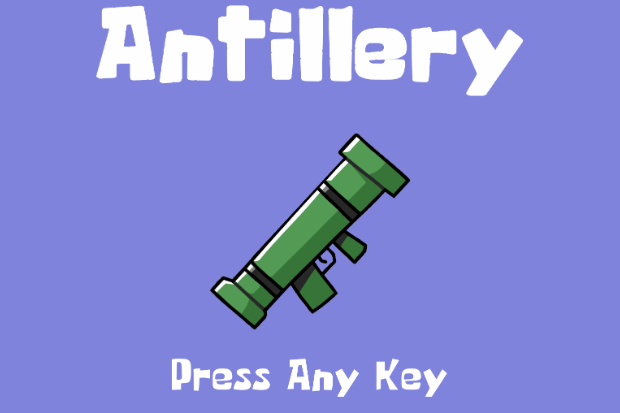
I proposed Antillery in Spring 2025 with a very ambitious scope and a long-term vision of evolving what makes Worms-style games so fun. During the implementation period in Fall 2025, I had to significantly reduce the scope to ship a viable MVP alpha build. The original proposal remains the long-term direction for the project, and it now serves as my roadmap for moving forward. During a match, two teams take turns moving, aiming, and blowing holes in a destructible map using an array of artillery options.
Build Download
[ Coming Soon ]
Technologies Used
Core Technologies
- Unity 2D, C#
- Unity Input System (action maps)
- ScriptableObject state/events, Addressables
- Destructible terrain (TerraformingTerrain2D)
- UI Toolkit, TextMeshPro
Development Tools
- Unity Editor
- GitHub, Git LFS
- Rider / Visual Studio / VS Code
- .NET 9 supporting utilities
Architecture
Game Flow System
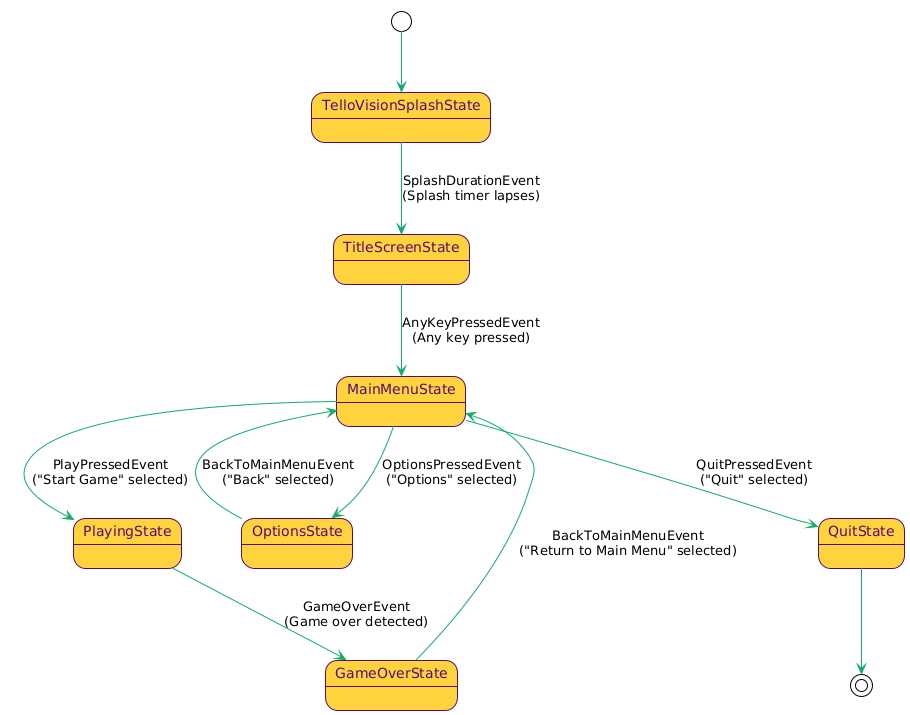
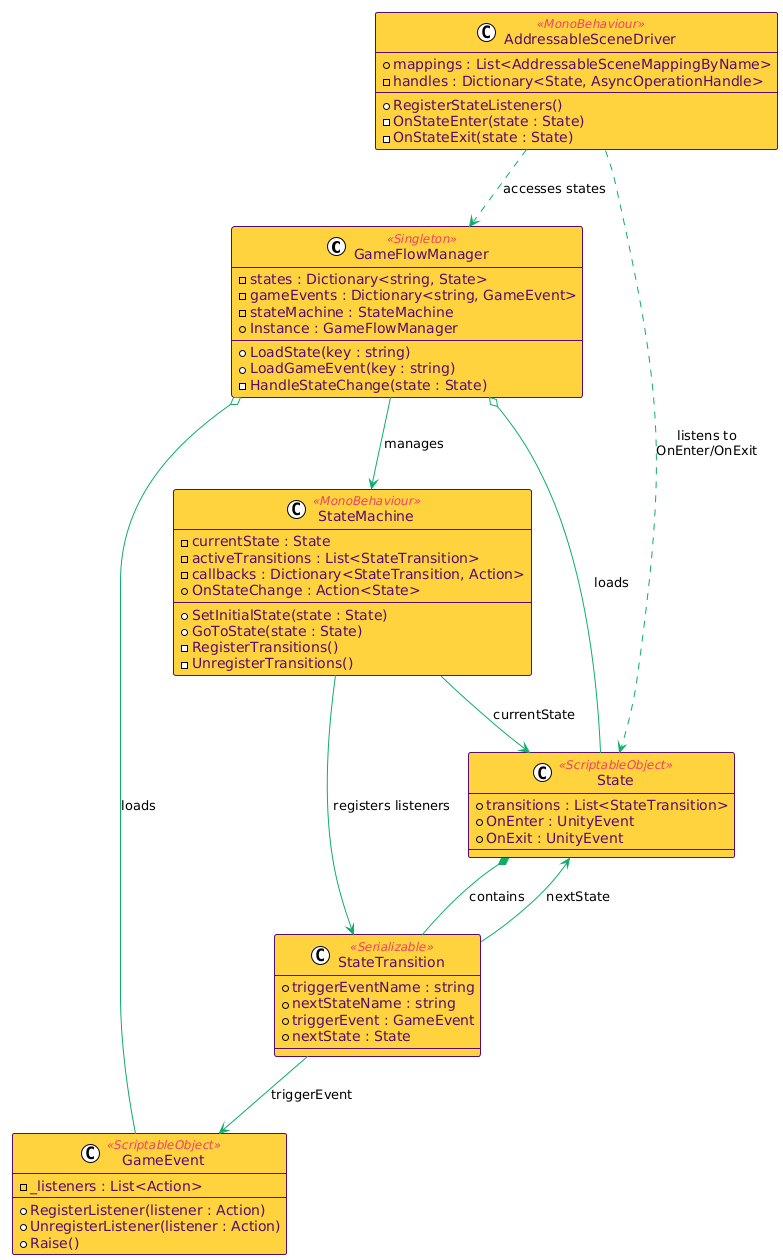
Architecturally, everything revolves around two state machines. The first is a software-level state machine (GameFlowStateMachine) built with ScriptableObjects. Each state represents a screen or mode, such as splash and title screens, menus, playing mode, and the game-over results screen. Each ScriptableObject state is associated with a Unity scene, which I load and unload asynchronously using Unity Addressables. Scene controller objects raise ScriptableObject events that drive transitions in the Game Flow layer.
Game Flow State Machine
Game Flow Layer Class Diagram
Turn Flow System
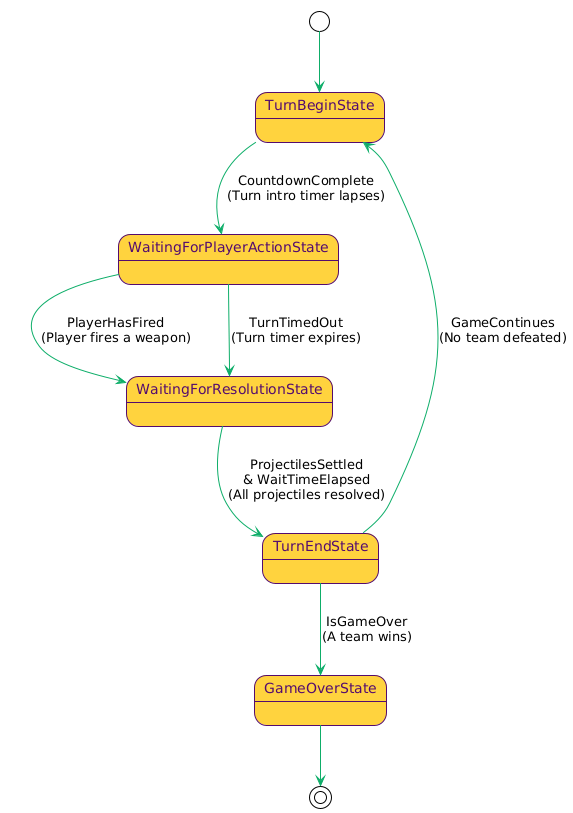
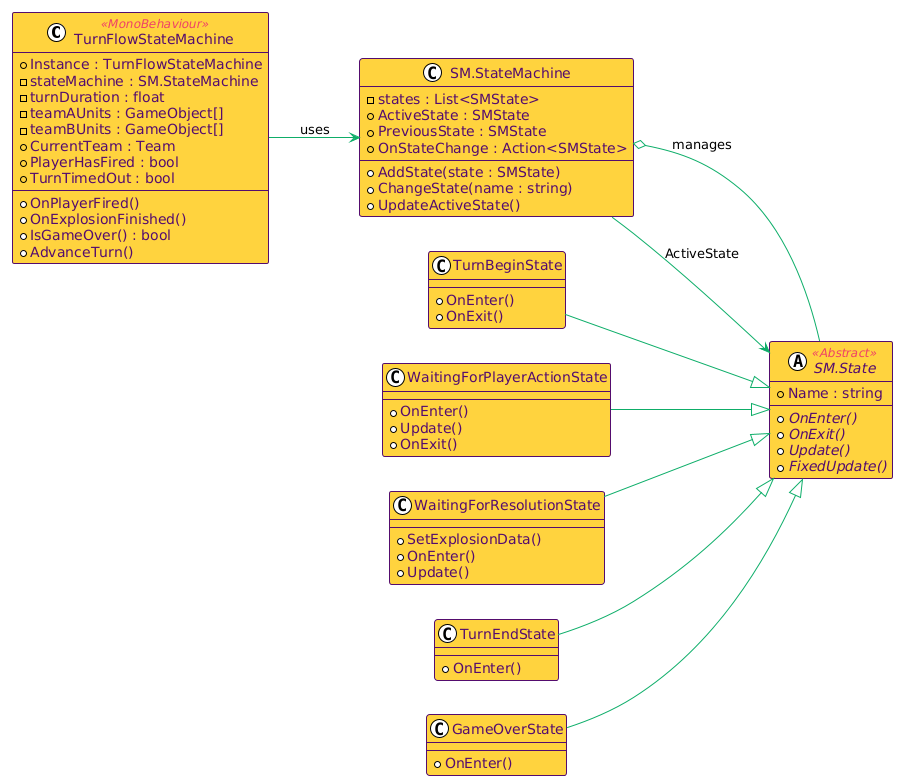
The Turn Flow layer exists within the PlayingState of the GameFlowStateMachine, its key coordinator being the TurnFlowStateMachine. It enforces the match loop through states like TurnBegin, WaitingForPlayerAction, WaitingForResolution, TurnEnd, and GameOver. It cycles active units, runs a turn timer, and ends the action phase when the player fires or when time runs out. It then resolves explosions and damage before moving to the next turn or finishing the match.
Turn Flow State Diagram
Turn Flow Layer Class Diagram
Unit System
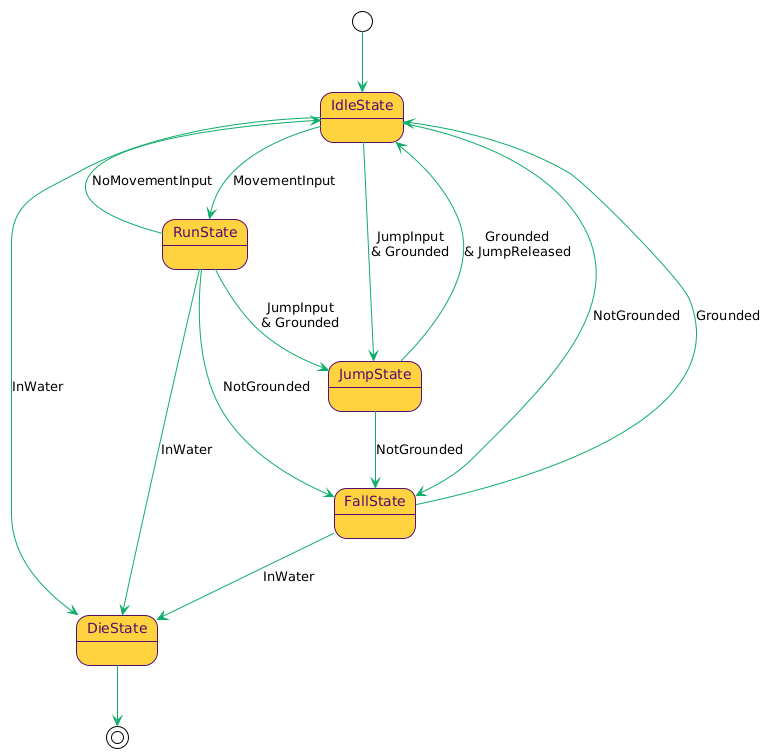
Unit State Machine
Weapon & Inventory Systems
Input uses the Unity Input System. Any interactive Game Flow state has an associated action map that is enabled based on context, so menu input cannot trigger gameplay actions. During gameplay, units receive input through an IInput abstraction wrapped by a ControllableInput gate, and the turn system only enables that gate for the active unit.
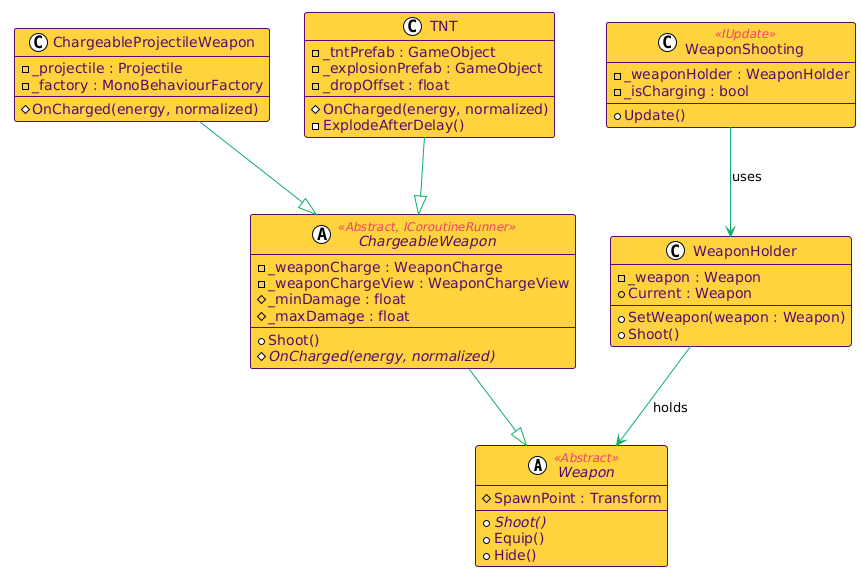
Weapon System Class Diagram
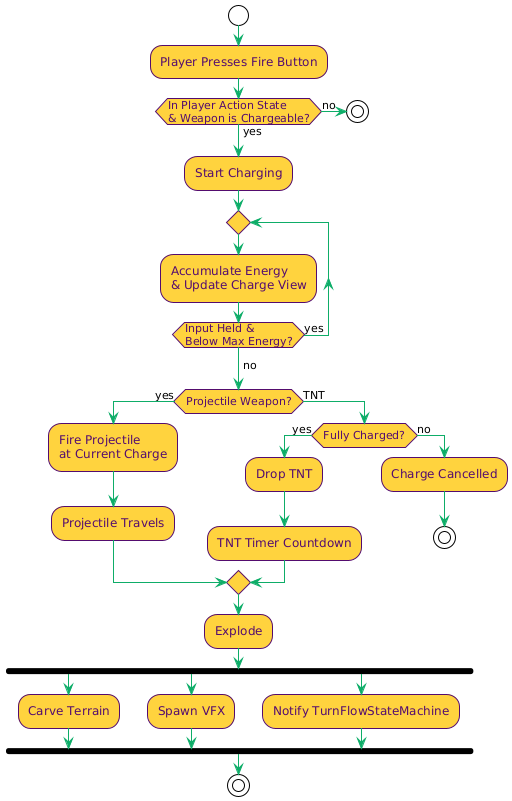
Chargeable Weapon Activity Diagram
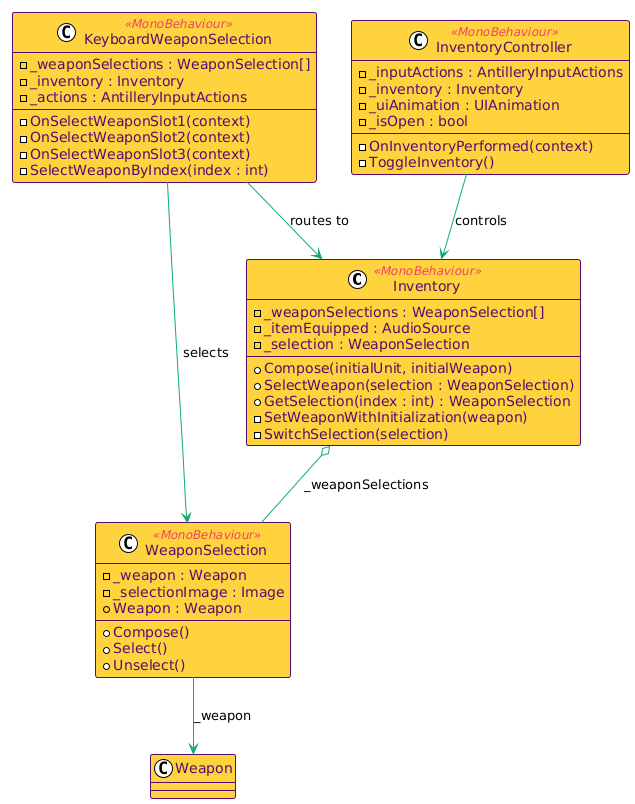
Inventory System Class Diagram
Implementation Details
On the gameplay side, Antillery features player movement and jumping, a weapon inventory UI, and multiple destruction-based weapons (a future version will also include constructive tools). The current weapon set (Bazooka, TNT, Grenades) is a specialization of the ChargeableWeapon base class. When a projectile impacts or when timed explosives, such as TNT and grenades, detonate, it broadcasts explosion data, including position, blast radius, and damage. The TurnFlowStateMachine uses this data during its resolution step to apply damage and manage terrain deformation.
For destructible terrain, I prototyped utilities in .NET for generating Signed Distance Field (SDF) files from map images. I also researched a Marching Squares-based approach for generating collider rectangles from those SDFs. I ultimately chose to integrate the TerraformingTerrain2D Unity package to keep the project moving after my initial attempts failed to meet my performance expectations. TerraformingTerrain2D also employs a Marching Squares-based approach, providing real-time terrain deformation and collider recalculation without interrupting the match flow.
The alpha build delivers a complete match loop: teams take turns controlling one ant at a time, moving and jumping, selecting a weapon, aiming with the cursor, and firing to end the turn. Each turn includes a brief countdown, a time limit, and a resolution phase that applies damage and deforms terrain.
Under the hood, Antillery is driven by state machines and input gating. The InputManager enables a single action map per game state, and weapon behavior is implemented through a shared charge-to-fire framework (including projectiles and TNT with a fuse). The inventory UI supports quick weapon selection via keyboard slots.
Key Features
- Offline 2-player local play
- Turn limited by time or action
- Destructible terrain
- Charge-to-fire weapons (projectiles and TNT)
- Inventory UI with quick slot keys
Project Architecture
- Layered systems (Flow / Input / Turns / Entities / Services)
- Game Flow state machine (ScriptableObjects)
- Addressables-driven scene loading
- Turn flow states (begin, act, resolve, end)
- Input routed to the active unit only
Platform & Requirements
Windows desktop (tested on 64-bit Windows 11). Offline play; no internet required.
Controls
Main Menu
W/S: Move up/down
Space: Select
Options Menu
W/S: Move up/down
Space: Select
Gameplay
A/D: Move left/right
Shift: Jump
I:
Inventory
1/2/3: Select weapon
Space: Charge/shoot
Results Screen
Space: Select option
Development Challenges
State-Scoped Input Maps
Menus and gameplay need different bindings and behaviors (navigation and selection versus movement and aiming). Without strict switching, inputs can leak and trigger actions in the wrong context.
Mapped input by Game Flow state. On every state transition, the InputManager disables all action maps and enables only the one for the active state.
Active-Unit Input Gating
Multiple ants run in the scene, but only the current unit should respond to movement and weapon input. Early on, more than one unit could react to the same controls.
Routed gameplay input through an IInput abstraction and a ControllableInput wrapper. The Turn Flow system enables input only for the active unit each turn, while all other units ignore player control.
Explosion Resolution Ordering
Explosions must stay consistent across damage, terrain deformation, and collision updates. If the order is wrong, craters, colliders, and damage timing fall out of sync.
Weapons publish explosion data (position, radius, damage). The resolution phase applies distance-based damage, then uses TerraformingTerrain2D to carve terrain and refresh colliders.
Alpha Scope Lock
The proposal included more stretch features than a single semester could support. The priority was shipping a complete, stable alpha match loop with the core systems working together.
Focused delivery on turn flow, state-driven input routing, destructible terrain, and a small core weapon set (projectile weapon, grenade, and TNT), then captured the rest as a roadmap below.
Testing and Validation
Ensuring the game works reliably through full matches, identifying edge cases, and incorporating feedback from playtesters to catch issues not apparent during solo testing.
Conducted repeated full matches to validate turn rotation, timers, active-unit input gating, weapon charging and resolution, terrain deformation, and game-over conditions. Brought in playtesters to expose unknown problems. The current build targets 64-bit Windows 11 and does not require an internet connection. There are still many known bugs, and likely unknown ones as well. I plan to address them as I continue to develop beyond the current alpha.
Future Enhancements
Bug Fixes
Fix the inventory UI opening and closing at the start of each unit’s turn, and resolve grounding edge cases (for example, landing on another ant’s head) that can leave a unit stuck.
Camera
Replace the static camera with a dynamic view that tracks the active unit and smoothly recenters when the next unit becomes active.
Options Screen
Implement real audio and video settings, wire them to configuration values, and save preferences between sessions.
Visual Polish
Redraw the ant sprites to feel more cohesive and do an aesthetic pass on menus, inventory, and the results screen.
Weapons & Tools
Add more weapon types and introduce peace-oriented tools that patch terrain or briefly pin a unit in place.
Map Editor
Build a simple map editor and support loading and sharing custom maps.
Devlogs
View All Devlogs
- Antillery: A 2D turn-based artillery game (May 16, 2025)
- Choosing a Unity Version (May 17, 2025)
- Unity Packages in Consideration (May 18, 2025)
- Game Flow State System (May 25, 2025)
- Revised Game Flow (May 27, 2025)
- Development Roadmap (May 28, 2025)
- Introduction to Antillery (May 31, 2025)
- Who is Antillery For? (June 2, 2025)